

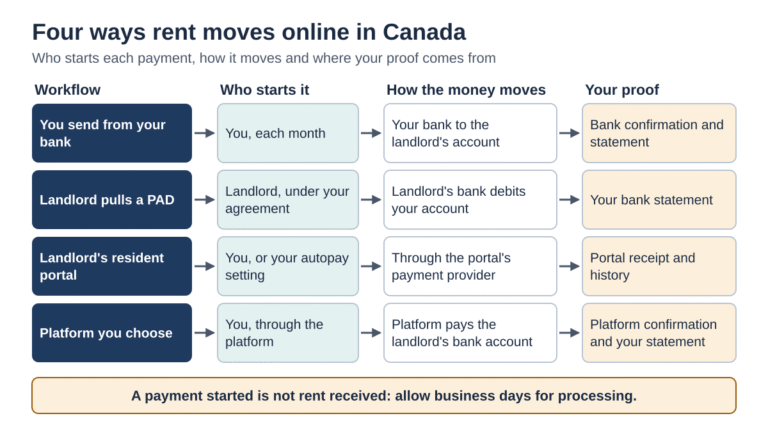
Four common online rent-payment workflows are: sending money from their own bank each month, letting the landlord pull a pre-authorized debit, using the landlord’s resident portal, or using a payment platform they choose themselves. The workflows differ in who starts each payment, where your proof of payment comes from, and who sorts out a payment that fails. Your lease and provincial rules also shape the choice, because a landlord cannot always insist on automatic payments.
Comparisons of rent payment options usually focus on the method: debit, credit card or bank transfer. The method matters, but your month-to-month experience depends more on the workflow wrapped around it. Who presses the button each month? Who sends the receipt? Who notices first when a payment bounces, and who has to fix it?
This article maps four common workflows step by step, so you can pick the one that suits how you manage money and what your landlord accepts. It is general information for renters in Canada, not legal advice.
Four common ways rent moves online, and who starts each payment.
The Four Stages of Any Online Rent Payment
Every online rent payment passes through the same four stages, whatever method you use:
1. Start. Someone initiates the payment: you, your landlord or a platform acting on your instructions.
2. Movement. The money travels through the banking system. Everyday electronic items such as pre-authorized debits and direct deposits are cleared through Payments Canada’s Automated Clearing Settlement System, and Payments Canada explains that the previous day’s net balances between institutions settle each business morning.
3. Confirmation. Someone tells you the payment worked, or that it did not.
4. Record. You keep proof that the right amount was paid on time.
The gap between the first and third stages is the part renters most often forget. A payment you started on the due date is not the same as rent your landlord has received, so leave room for processing time.
Workflow 1: You Send It From Your Bank
You log in to online banking each month and send the rent yourself, by Interac e-Transfer or by bill payment if your landlord is set up as a payee with your bank.
- Who starts it: you, every month, unless you schedule it.
- Your proof: your bank’s confirmation and statement.
- If it fails: check the bank status and contact your bank before resending, so you do not pay twice.
This workflow keeps you in control and needs nothing from the landlord except their payment details. The trade-off is monthly effort and the risk of forgetting. The Financial Consumer Agency of Canada (FCAC) points out that automatic payments you set up through your own bank differ from pre-authorized debits, because the biller never gets permission to withdraw money from your account.
Workflow 2: Your Landlord Pulls a Pre-Authorized Debit
You sign a PAD agreement, and your landlord or property manager withdraws rent on the agreed date.
- Who starts it: the landlord, under your agreement.
- Your proof: your bank statement, plus any notice the landlord sends.
- If it fails: the debit is returned, and the landlord or its processor receives the return information; notification timing varies.
According to Payments Canada’s PAD guide for consumers, a biller may retry a debit returned for insufficient or uncleared funds once within 30 days, and only for the exact same amount. Your bank may also charge its own non-sufficient funds fee, so make sure the funds are there when the debit runs.
Workflow 3: You Pay Through Your Landlord’s Portal
Many larger buildings use a resident portal chosen by the property manager. You sign in, pick one of the methods the portal offers and pay.
- Who starts it: you, or an autopay setting you control.
- Your proof: the portal’s receipt and payment history.
- If it fails: check the portal and contact its support team; resident and manager views may update at different times.
The benefit is a shared record, when the portal provides consistent records to residents and managers. The limitation is choice: you can use only the methods the manager has switched on.
Workflow 4: You Pay Through a Platform You Choose
Some third-party platforms let renters pay by the method they prefer, then deliver the money to the landlord’s bank account.
- Who starts it: you, through the platform.
- Your proof: the platform’s confirmation, plus your own bank or card statement.
- If it fails: the platform notifies you, and you may be able to retry with a different method.
TenantPay is one example of this workflow. Its site says renters can pay by pre-authorized debit or card, earn points through a loyalty program and choose to switch on credit reporting to Equifax, with funds sent to the landlord’s bank account and no landlord sign-up needed. Landlords who do join get their own portal. Fees differ by payment method and terms can change, so check the current details, and confirm your landlord is comfortable receiving rent this way.
Side-by-Side Comparison
| Workflow | Who starts each payment | Main proof of payment | Where to check or seek help |
|---|---|---|---|
| You send from your bank | You | Bank confirmation and statement | Bank status and support |
| Landlord pulls a PAD | Landlord or processor, under your agreement | Bank statement | Landlord or processor and your bank |
| Landlord’s resident portal | You or your autopay setting | Portal receipt and history | Portal support or property manager |
| Platform you choose | You, through the platform | Platform confirmation and statement | Platform support; tell the landlord about any delay |
What Your Lease and Province Say
Payment methods are often written into the lease, and provincial rules limit what a landlord can insist on. In Ontario, for example, the Landlord and Tenant Board’s guide to the Residential Tenancies Act says a landlord and tenant can agree to post-dated cheques or automatic payments, but a landlord cannot require either one. Once a method is agreed, it stays in place unless both sides agree to change it. The same guide says a landlord must give a receipt for rent when the tenant asks, free of charge.
Other provinces have their own rules, so check with your province’s residential tenancy office before assuming any method is required or off limits.
Questions to Settle Before You Switch
- Does your landlord accept this workflow, and is that agreement in writing?
- What date must the money arrive by, rather than be sent by?
- How many business days does the workflow take to deliver funds?
- What does each method cost you per payment?
- Where will your receipts live, and can you download them?
- If you stop, how do you cancel future payments, and what replaces them?
Conclusion
The best online rent payment workflow is the one where you know who starts each payment, when the money actually lands and who fixes a failure. Sending it yourself gives you control, a PAD gives automation, a portal gives a shared record, and a platform you pick gives flexibility over method and extras. Whichever you choose, agree it with your landlord, allow for processing time and keep your own records of every payment.
Frequently Asked Questions
Can my landlord make me pay rent by pre-authorized debit?
It depends on your province. In Ontario, a landlord cannot require automatic payments, although you can agree to them. Check your own province’s tenancy rules.
When does rent count as paid?
Check the applicable tenancy rules, your agreed payment method and the lease. A bank or platform submission receipt alone may not prove the landlord has received the funds, so confirm the deadline and allow processing time.
Does cancelling a pre-authorized debit cancel my rent?
No. Payments Canada says ending a PAD agreement leaves the underlying contract and any amount owed in place. Arrange another way to pay first.
What proof of payment should I keep?
Keep confirmations, bank or card statements and receipts. In Ontario, your landlord must give you a rent receipt on request at no charge.
Can I use a third-party platform if my landlord has not signed up?
Some platforms deliver rent to the landlord’s bank account without the landlord joining. Confirm your landlord accepts payment that way before you start.