

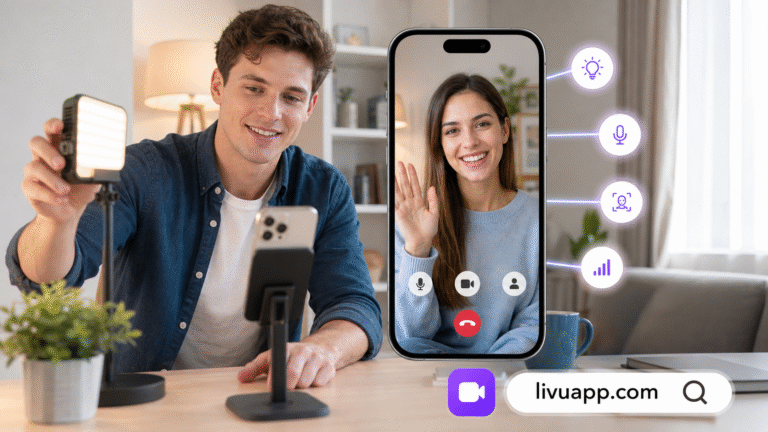
Starting an online video conversation may require only a click, but a good experience often begins a few minutes earlier.
Camera position, lighting, background noise, and even the way someone enters a conversation can affect how comfortable the interaction feels. These details do not require professional equipment or a carefully designed studio. A few small adjustments can help users appear clearer, hear the other person more easily, and focus on the conversation instead of fixing technical problems.
For anyone interested in spontaneous online conversations, here is a practical five-minute routine that can improve the experience before the first hello.
Minute One: Choose a Comfortable Location
The first step is finding a place where it will be easy to speak and listen.
A busy café, shared room, or noisy street may make a spontaneous chat harder to enjoy. Even when the internet connection is stable, competing voices and background sounds can force both participants to repeat themselves.
A better location does not need to be completely silent. It simply needs to be calm enough for a normal conversation. Closing a door, moving away from a television, or choosing a quieter corner can make a noticeable difference.
Users searching for a coomeet alternative no registration are often trying to reduce the steps between visiting a platform and meeting someone. Fast access can be useful, but it is still worth spending a moment checking the platform’s current entry requirements and preparing the physical space before starting.
Convenience helps people enter a conversation. A suitable environment helps them remain in it.
Minute Two: Put the Light in Front of You
Lighting has a greater effect on video quality than many people realize.
When the brightest light is directly behind someone, the camera may expose the window or lamp instead of the person’s face. This can turn the participant into a dark silhouette, even if the room appears bright to the human eye.
The simplest solution is to face a window or place a lamp slightly behind the camera. Soft light falling toward the face usually creates a clearer and more natural image.
Users do not need a ring light or professional photography equipment. Daylight from a window is often enough. If the light feels too strong, moving a little farther away or using a thin curtain can soften it.
Before joining a call, it helps to open the camera preview and ask three quick questions:
- Is my face clearly visible?
- Is the background much brighter than I am?
- Does the image look natural rather than overly dark or washed out?
This check takes only a few seconds and can prevent an entire conversation from being affected by poor visibility.
Minute Three: Adjust the Camera Angle
Holding a phone throughout a long conversation can become uncomfortable. It may also cause the image to shake or create an unflattering angle.
Whenever possible, the camera should be positioned close to eye level. A phone stand is useful, but a stable shelf or a stack of books can achieve a similar result. The goal is to create a relaxed frame in which the user does not need to constantly adjust the device.
During a video call 1 v 1, both participants occupy a significant part of each other’s screens. Small framing improvements can therefore have a large effect on the experience.
A good frame generally includes the head and upper shoulders, with a little space above the head. Placing the camera too close can feel visually intense, while positioning it too far away may make facial expressions difficult to see.
The camera lens should also receive attention. Smartphone lenses easily collect fingerprints and dust. Wiping the lens with a clean, soft cloth can make a blurry image look noticeably clearer.
Minute Four: Test the Sound and Connection
Clear audio is often more important than perfect video.
People can usually continue a conversation when the picture briefly loses sharpness. Repeated audio interruptions are more disruptive because they break the meaning and rhythm of what is being said.
Before starting, users can record a short voice note or test the microphone through the device’s settings. This reveals whether the microphone is obstructed, the volume is too low, or nearby noise is dominating the recording.
Earphones can help in rooms that produce echoes, but they are not always necessary. When using wireless earbuds, checking the battery level beforehand can prevent them from disconnecting during the call.
Connection quality matters as well. Moving closer to the Wi-Fi router, closing a large download, or switching off an unnecessary high-bandwidth stream may improve call stability.
The purpose of this preparation is not to create a flawless broadcast. It is to remove avoidable distractions so both participants can concentrate on talking.
Minute Five: Prepare an Easy Opening
Once the technical setup is ready, the final step is preparing to begin.
Many first conversations become awkward because both people wait for the other person to introduce a topic. A simple opening question can give the interaction immediate direction.
Useful questions are easy to answer without requiring private information. For example:
- What has been the best part of your day?
- What music have you listened to recently?
- Is there a movie or series you would recommend?
- What food is popular where you live?
- What hobby would you like to learn?
- Do you prefer the beach, mountains, or city trips?
These questions work because they are specific enough to generate an answer but open enough to create follow-up topics.
It is usually better to prepare one or two ideas than to create a long list. A natural conversation develops from listening. If someone mentions a favorite movie, asking why they enjoyed it will feel more genuine than immediately changing to an unrelated prepared question.
Do Not Treat Fast Access as a Reason to Rush
Low-friction platforms are appealing because they allow people to move quickly from curiosity to conversation. However, a fast entry process does not mean the interaction itself should feel rushed.
Someone searching for a coomeet alternative no registration may primarily want convenience. Registration and access conditions can differ between services, regions, devices, and account versions, so users should confirm the current requirements directly on the platform they choose.
After entering a chat, it is worth allowing a few moments for the conversation to establish itself. A brief pause is not necessarily a sign that the interaction has failed. Both participants may simply be deciding what to say next.
At the same time, users are never required to continue a conversation that feels uncomfortable. They can leave, move on, and use available platform controls when necessary.
Small Habits Create Better Conversations
LivU combines one-to-one video communication with instant matching and other social discovery features. Its format allows people to meet and speak in real time without needing to organize a scheduled call beforehand.
That spontaneity is part of the appeal, but preparation and spontaneity are not opposites. Spending five minutes on the environment, lighting, camera, audio, and opening topic can make an unscheduled interaction feel easier and more polished.
A video call 1 v 1 works best when the technology becomes less noticeable. Once users can see and hear each other clearly, the device stops being the main subject of the experience. Attention moves toward expressions, stories, reactions, and the direction of the conversation.
Final Thoughts
Good video chats do not depend on expensive equipment or a perfect room. They depend on removing a few common obstacles before they interrupt the interaction.
Choose a quieter location. Face a soft light. Place the camera near eye level. Test the microphone and connection. Keep one easy question in mind.
These steps require only a few minutes, but they can help a first conversation feel clearer, calmer, and more natural from the moment it begins.